Labels Collection Framelits

Labels Collection Framelits are one of Stampin Up Framelits sets that you can use for various rubber stamping techniques.  Today, I have for you a “thinking of you card” made with the Labels Collection Framelits and the card features stamping multiple card stock layersStampin Up Framelits

Before discussing the Labels Collection Framelits, let me share information about the  first layer for the card.  It reflects the hot waxing technique, which I’ve not used before but really enjoyed it.  I heated gold, silver, and red wax, one at a time, and spread it across the cardstock to create the background.   I used one of the Adorning Accents Edgelits (125595) to shape the top of the card stock. 

Now, on to the Labels Collections Framelits cut outs that make up the center piece of the card.  I used three of the Labels Collections Framelits.  Counting from the largest to the smallest with the largest numbered 5, I used the 4th, 3rd, and 2nd frames from the Labels Collections Framelits.   To begin the layering of the frames on which to stamp, I used a temporary adhesive on the back side of the frames and glued the 2nd frame to the 3rd and the 3rd to the 4th, as shown below.

Labels Collection Framelits

To decorate the Labels Collection Framelits cut outs and create the card, follow these steps:

1. Using the flower image from the Papaya Collage Stamp Set (126612), cover the stamp with Pretty In Pink Ink (126955) and randomly stamp the image.

Labels Collection Framelits

2.  Using the multiple floral stamp from the Betsy’s Blossoms Stamp Set (126006), cover the largest flower with VersaMark Ink and randomly stamp around the Labels Collection Framelits cut outs.

3.  Cover the VersaMark images with Gold Emboss Powder (109129) and set with heat. Labels Collection Framelits

 4.  Cover the leaf on the flower stamp from the Papaya Collage Stamp Set with the Gumball Green Stampin’ Write Marker and stamp the image in the spots shown in the below image.

Stampin Up Framelits

5.  Cut an 8-1/2″ x 5-1/2″ piece of Pretty in Pink Card Stock (100459) and fold in the center to create the card base.

6.  Emboss the top front of the card base with one of the Adorning Accents Folders (125601).

7.  Adhere your first layer (mine is the waxed background) to the card base.

8.  Adhere the decorated Labels Collection Framelits cut outs onto the first layer.

9. Stamp the sentiment, “thinking of you” onto a piece of Pretty in Pink Card Stock with VersaMark ink.  Cover with Gold Emboss Powder and heat set it.  Attach to the card.

Buy Stampin Up Products

God’s Blessings!

Stamping With Guneaux Designs

by

Beverly Polen

Enjoy your Labels Collection Framelits!

Labels Collection Framelits – Thoughts and Prayers

I could not do without the Stampin’ Up! Labels Collection Framelits, as well as all of the Stampin’ Up!’s framelits, as well as the Thoughts and Prayers stamp set.  To me, the Labels Collection Framelits and all of the other framelits are must-have tools for creating paper crafts. The Labels Collection Framelits may be designed to cut certain stamp cut images, but they certainly may be used for other purposes.

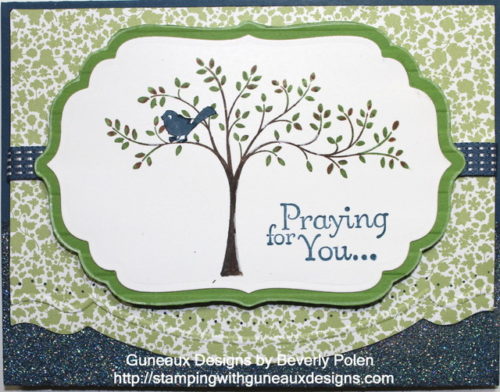
The card share for you today features the Labels Collection Framelits and Thoughts and Prayers Stamp Set.  To use the  Labels Collection Framelits, you will need the Big Shot, its multipurpose platform (Tab 1), and standard cutting pads.  Below are instructions for making this card.


STAMPIN UP PRODUCTS:

STAMPS:  Thoughts and Prayers (127805) ; PAPER:  Midnight Muse Card Stock (126843), Gumball Green Card Stock (126840), Whisper White Card Stock (100730), and Twitterpated Designer Series Paper (125406); INK: Soft Suede Stampin’ Write Marker (119703), Gumball Green Stampin’ Write Marker (126856), Midnight Muse Classic Stampin’ Pad (126860), and White Gel Pen (105021); ACCESSORIES: Labels Collection Framelits (125598), Strips Embossing Folder (123128), Adorning Accents Embossing Folders (125601), Adorning Accents Edgelits (125595), Essentials Paper Piercing Pack (126187), VersaMark Pad (102283), Dazzling Diamond Stampin’ Glitter(102023), Heat and Stick Powder (100625), Heat Tool (129053), Stampin’ Pierce Mat (126199), Paper-Piercing Tool (126189), and Midnight Muse 3/8″ Stitched Satin Ribbon (126847)

INSTRUCTIONS:

Card Base:

1.  Cut a 8-1/2″ x 5-1/2″ piece of Midnight Muse Card Stock and fold it in half.

2.  Stamp the VersaMark Pad onto the bottom 1″ of the front of the card base.

3.  Apply Heat and Stick Powder over the VersaMark Ink and heat set with the Heat Tool.

4.  Apply the Dazzling Diamond Stampin’ Glitter over the Heat and Stick Powder and heat set again.

First Layer:

5.  Cut a 4″ x 5-1/4″ piece of the green design (see picture) from the Twitterpated DSP.

6.  Assemble a sandwich to run through the Big Shot in this order:  a) multipurpose platform on Tab 1, b) Cutting Pad, c) DSP piece, d) Adorning Accents Edgelit, and e) Cutting Pad.  Run through  the Big Shot.

7. Place the piece of DSP inside the Adorning Accents Embossing Folder aligning it just above the cut created with the Adorning Accents Edgelit.  Create a Big Shot sandwich with the multipurpose platform on Tab 2 and run through the Big Shot.

8.  Place the DSP onto the Paper-Piercing Mat, lay the same design (i.e., that used with the embossing folder) from the Essentials Paper-Piercing Pack onto the DSP, and pierce the DSP with the Paper-Piercing Tool following the design grid.

Center Piece:

9.  Cover the tree stamp image from the Thoughts and Prayers with ink:  trunk and branches – Soft Suede; leaves – Gumball Green.  Stamp the tree image onto Whisper White Card Stock.

10.  Place the 3rd largest frame from the Frames Collection Framelits onto the Whisper White Card Stock ensuring it is centered over the tree image.  Create a Big Shot sandwich with these items and cut out the image.

11.  Using the Midnight Muse Classic Stampin’ Pad, stamp the sentiment, Praying for You, onto the bottom-right corner.

Center Piece Mat:

12.  Place a piece of Gumball Green Card Stock into the Strips Embossing Folder and run through the Big Shot (on Tab 2).

13.  Place the same frame from the Frames Collection Framelits onto the Gumball Green Card Stock.  Trace around the frame with a pencil.  Cut out the frame and use the White Gel Pen around the edge.  Adhere the Whisper White Card Stock with image onto the mat.

Assemble Card:

14.  Adhere a piece of the Midnight Muse Ribbon across the DSP.

15.  Adhere the DSP onto the card base front.

16.  Adhere the matted centerpiece to the DSP and enjoy your card.


God’s Blessings!

Stamping With Guneaux Designs

Beverly Polen

My Digital Studio – Scrapbook Page

My Digital Studio is an intutive digital design software featuring Stampin’ Up!’s exclusive artwork, colors, and templates for creating multiple digital items.  If you are a beginner with My Digital Studio, this site provides you with great videos for training beginners.  My share with you today is a My Digital Studio Scrapbook Page and it is one for featuring your summer memories.

My Digital Studio Scrapbook Page

MY DIGITAL STUDIO SCRAPBOOK PAGE INSTRUCTIONS:

1.  Within My Digital Studio, select Photobooks and Individual Pages, 12” x 12” Square and Create Your Own. Name your new project.

2. Under the Design Center, select Background Papers, Card Stock, Daffodil Delight, and OK.

3.  Select Background Paper, Designer Series Paper (DSP), Summer Smooches, Summer Smooches – 9, Add as a Layer, and OK.

4. Double click on the small square of the DSP that appears.  Place cursor over the double arrows (<->) and resize to 11-3/4” x 11-3/4”.

5. Move the DSP to the center of the Daffodil Delight background paper.

6.  Select Punches, Add Punch, Basics (category), Scallop Circle Punch, Apply, and Close.  Double click the Scallop Circle and resize it to 10” (W) and 10.24” (H). 

 8.  With the Scallop Circle highlighted, select Paper Fill (under Punches), Designer Kits, Summer Smooches, Summer Smooches – 2, and OK.

 9.  Click on Mat (under Punches), Size – 4, Color – Change, Island Indigo, OK, and OK.

10. Move the Scallop Circle to the bottom right with part of it outside of the design area.

 11. Select Punches, Add Punch, Basics, Scallop Circle Punch, Apply, and Close.

12. Double click on the Scallop Circle and resize it to 7.54” (W) and 7.72” (H). With it highlighted, select Color Fill, Real Red, and OK.

13. Click on Mat, Size – 2, Color – Change, Tempting Turquoise, OK, and OK.

14. Move the Scallop Circle to the bottom right with part of it outside of the design area.

15. Select Punches, Add Punch, Basics, 1.25” Square Punch, Apply, and CloseDouble click and resize it to 5.64” (W) and 4.84” (H). Click on Color Fill, Real Red, and OK. 

16.  Right click the Square Punch and select Send Backward until it is behind the large Scallop Circle.

17.  Select Punches, Add Punch, Basics, 1.25” Square Punch, Apply, and CloseDouble click on the Square Punch and resize it to 3.9” (W) and 4.14” (H). Click on Color Fill, Tempting Turquoise, and OK.

18. Center the Tempting Turquoise Square Punch over the Real Read Square Punch. Right click on the Tempting Turquoise Square Punch and select Send Backward until it is behind the large Scallop Circle.

19. Select Punches, Add Punch, Borders, Scallop Edge Punch, Apply, and Close.  Color Fill it Tempting Turquoise.

20. With the Scallop Edge Punch highlighted and under Rotate, move the slide to -180.  Move the punch on top of the Real Red Square (see picture).  Right click it and select Send Backward until it is behind the large Scallop Circle.

21. Select Punches, Add Punch, Borders, Scallop Edge Punch, Apply, and Close.  Color Fill it Tempting Turquoise.  Move it to the bottom of the Real Red Square, right click it, and select Send Backward until it is behind the large Scallop Circle.

22. Select Stamps, Add Stamp, King of the Grill, King of the Grill – hot grillSelect Change Color and Real Red. Move the stamp over the Tempting Turquoise Square.

23. Select Embellishments, Add Embellishment, Summer Smooches – fabric brads, Summer Smooches – fabric brad – 2, Apply, and CloseDouble click the brad and resize it to 1” (W) and 1” (H). 

24. Right click the brad and select Copy and Paste.  Repeat and move the three brads to the corners of the page. 

25. Select Add Stamp and Broadsheet Alphabet.  Select the letters to spell “SUMMER” and rotate the letters according to the picture.

25.  Cut photo into a circle and add on top the Real Red scallop. 

Buy Stampin' Up! ProductsGod’s Blessings!

Stamping With Guneaux Designs

Beverly Polen 

Enjoy creating your My Digital Studio Scrapbook Page! 

Stampin Up Petal Cone Die

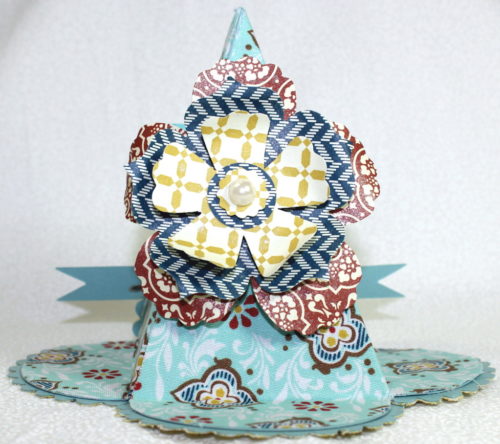
Here is a 3-D project featuring the must-have Stampin’ Up! Petal Cone Die (item #120890).  I love the Stampin Up Petal Cone Die as there are many 3-D projects that can be created with it.  You just have to think outside the box, as they say!

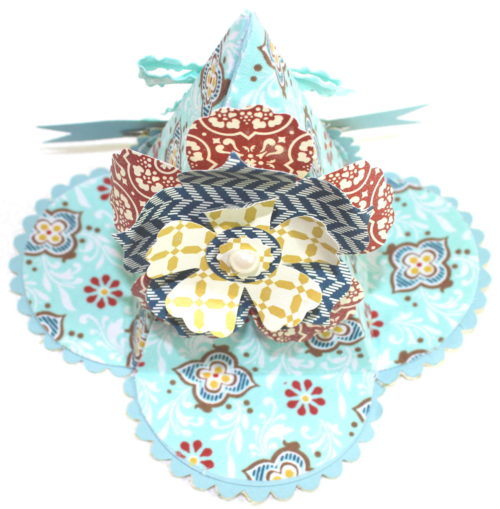
Thinking about the upcoming Thanksgiving Holiday, I thought that a place holder would be good if you are having a large family gathering.  Therefore, I made one with the Stampin Up Petal Cone Die as shown below.  This place holder would also be a nice gift to provide to your guests.

Petal Cone Placement Holder

STAMPIN UP SUPPLIES USED AND CATALOG NUMBERS (obviously you can choose your own paper and fabric):

PAPER:  Pool Party Card Stock (122924), and Comfort Cafe Designer Series Paper (126898)

ACCESSORIES:  Stampin Up Petal Cone Die (121810), Comfort Cafe Fabric (126894), Anywhere Glue Stick (104045), Sticky Strip (104294), Fun Flowers Bigz L Die (121812), Pool Party 3/8″ Ruffled Ribbon (122975), Designer Printed Brads (122940), Large Pearl Basic Jewel (125577), and Vanilla Shimmer Smooch Spritz (118772)

INSTRUCTIONS:

1.  Using the Stampin Up Petal Cone Die, cut two petal cones and one banner from the Pool Party Card Stock, and two petal cones from the Comfort Cafe Fabric (Pool Party design).

2.  Using the Stamping Up Petal Cone Die, cut four scallops from the Baja Breeze Card Stock, and four scallops from the Comfort Cafe Fabric (the yellow shade design of the fabric – see pictures).

3.  Adhere the yellow shade design of the Comfort Cafe Fabric scallops onto the Pool Party Card Stock scallops and set aside.

4  Completely cover one of the two Pool Party petal cones with the Anywhere Glue Stick.

5. Quickly adhere one piece of the Comfort Cafe Fabric Pool Party design to one Pool Party petal cone, and then repeat the same process for the other Pool Party petal cone.

6. Using Sticky Strip, glue together the two petal cone pieces covered with the fabric.

7.  Adhere the four scallop pieces of the yellow shade of Comfort Cafe Fabric and Pool Party Card Stock onto the flaps of the petal cone (see placement in the pictures).

8.  Cut out flowers from the Comfort Cafe Designer Series Paper using the Fun Flowers Bigz L Die and adhere them together.

9.  Adhere a Large Pearl into the center of the floral piece.

10.  Adhere the floral piece to one side of the finished petal cone.

11. Using the Vanilla Shimmer Smooch Spritz, cover the Pool Party Card Stock banner and let dry.

12.  Attach two Pool Party Designer Printed Brads to the Pool Party banner.

13.  On the other side of the finish petal cone, turn up one of the scallop pieces covered with the yellow design fabric and adhere it to the petal cone (see picture)

14.  Adhere the spritzed Pool Party Card Stock banner with the brads to the turned up scallop (see picture).

15.  Make a bow with the Pool Party Scalloped Ribbon and adhere it above the banner.

HERE ARE OTHER POSTINGS ON THE STAMPIN UP PETAL CONE DIE!

1. Table Decoration

2.  Workshop Name Holder

3.  Workshop Gift for Guests

4.  Wall Sconce

5.  Valentine Card

6.  Door Hanger

God’s Blessings!

Stamping With Guneaux Designs

Enjoy making your 3-D item using the Stampin Up Petal Cone Die

Stamping Multiple Card Stock Layers – Guneaux Designs

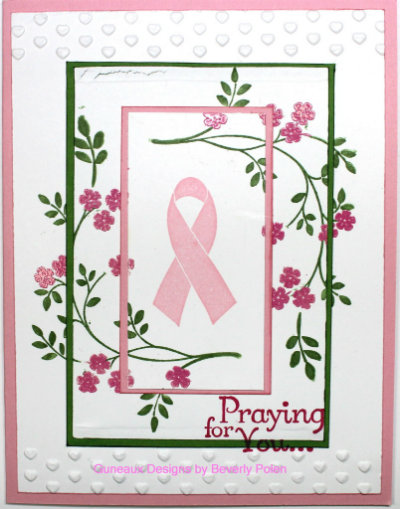
Stamping multiple card stock layers is a hot trend in the paper crafting world.  I created a card featuring the trend of stamping multiple card stock layers for an acquaintance who was diagnosed recently with breast cancer.  I wanted to send her a card to let her know that I care and am praying for her.  Therefore, I decided to use this technique of stamping multiple card stock layers for her card.

Everyone knows that the outcome of stamping multiple card stock layers would leave gaps in the stamped images, right?  Additionally, the result will be less than the aspired goal, which is to have a pretty card.  Agree?

Well, there is a method to use; however, you’ll still have gaps, but let’s see what we can do with those gaps.  Follow these instructions to use this technique:

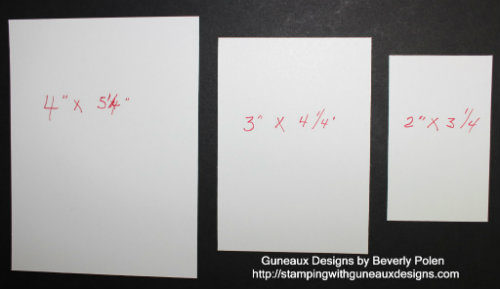
1.  Cut pieces of Whisper White Card Stock according to this picture:

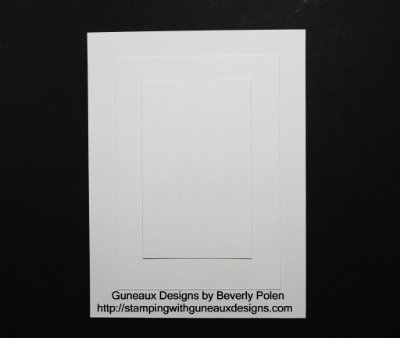
2.  Layer the Whisper White Card Stock according to the following picture.  You’ll need to use a temporary glue on the backside of the two top layers to prevent them from moving as you stamp the images.

3.  Using a single inked stamp, randomly stamp the image around the multiple card stock layers.

4.  Disassemble the three pieces of card stock.

5.  Cut two pieces of colored card stock that match your ink (your choice) of a size to form mats for the top two layers.

6.  Assemble the pieces and your gaps will appear as intended, and you’ll have a beautiful card, like this one.

Stampin’ Up! Supplies Used for the Above Card (including item numbers):

Paper:  Whisper White Card Stock (100730), Pretty in Pink Card Stock (100459), and Gumball Green Card Stock (126840)

Stamp Sets:  Thoughts and Prayers (127805 – c) and the retired Ribbon of Hope

Ink:  Gumball Green Stampin’ Write Marker (126856 – comes in one package of the new 2012-2014 In Colors) and Pretty in Pink Classic Stampin’ Pad (126861)

Accessories:  VersaMark Ink (102283), Melon Mambo Stampin’ Emboss Powder (123223) , Heat Gun (129053) , and Adorning Accents Folders (125601)

 Enjoy!

God’s Blessings!

Stamping With Guneaux Designs By Beverly Polen

Have fun Stamping Multiple Card Stock Layers

August and Stampin’ Up! Specials

August and Stampin’ Up! Specials!   August is a big month for Stampin’ Up! crafters! Let me share why!

August 1 Stampin’ Up! Special – MDS2: Today, the new upgraded Stampin’ Up! My Digital Studio (MDS2) becomes available! AND, you can try it out on a 30-day trial!! It can’t be any better!

  
August 1 Stamp’ Up! Special – Holiday Catalog: Today is the debut of the new Stampin’ Up! Holiday Catalog. Wow, so many wonderful items will be found in this catalog, which is a larger catalog than any previous holiday catalogs. What is your favorite item in this catalog?
 
 
(click on picture to see the catalog contents)


August 1 – 31 – Stampin’ Up! Special – 31% Discount: Beginning today through August 31, you can save 31% on 31 digital content items for the MDS2!  Yes, that’s right, 31% off on 31 digital content items!! Wow, what more could you want?

August 1 – 31 – Stampin’ Up! Special – Spooktacular Offer: During August, there are only treats – no tricks – for new Stampin’ Up! Demonstrators (i.e., those signing up during August)! New demonstrators will get a FREE Howl-o-ween Printer’s Tray project kit – a $60 value when they sign up. Remember, it’s only $99 to sign up under Guneaux Designs (scroll to the mid-section of the page) and create your own Starter Kit, choosing up to $125 in any current Stampin’ Up! products!

Whee, have I forgotten anything? If I remember other items, you are guaranteed that I’ll let you know!

Go to Guneaux Designs Facebook Business Page and like my page, PLEASE!
Follow me on Twitter too!

God’s Blessings!
 
 
Stamping With Guneaux Designs
By Beverly Polen