Stampin Up Flowering Flourishes – Thank You Card

Don’t you just love the Flowering Flourishes Stamp Set on page 121 of the Stampin’ Up! Annual Catalog?  Today’s card share is a quick and easy one that features the Flowering Flourishes Stamp Set.  The large stamp from from the set was used on the upper-left corner of the card, and the smallest stamp from the set was used on the lower-right of the card.

Notice that I used a Designer Series Fabric on the left side of the card.  I encourage you to think outside of the box and put fabric on your cards and scrapbook pages. Flowering Flourishes

 Flowering Flourishes


 Flowering Flourishes


 Stampin’ Up! Products:

Stamp Sets:  Flowering Flourishes (126367 – c) and Curly Cute (120510 – c)

Paper:  Whisper White Card Stock (100730) and Tempting Turquoise (102067)

Ink:  Wisteria Wonder Classic Pad (126985), Wisteria Wonder Stampin’ Write Marker (123002), Tempting Turquoise Classic Pad (126952), and Tempting Turquoise Stampin’ Write Marker (119702)

Accessories:  Wisteria Wonder Flirtatious Designer Fabric (122335), Wisteria Wonder 3/8″ Ruffled Ribbon (122973), Tempting Turquoise Brights Designer Button (119747), White Baker’s Twine (124262), 3/16″ Corner Punch (119871), and Stamp-A-Ma-Jig (101049)

Buy Stampin Up Products

Instructions:

  • Cut an 8-1/2″ x 5-1/2″ piece of Tempting Turquoise Card Stock and fold in the middle to create the card base.
  • Cut a 5-1/4″ x 4″ piece of Whisper White Card Stock. 
  • Cover with Wisteria Wonder Ink the large floral stamp in the stamp set.
  • Stamp the image on the upper-left corner of the 5-1/4″ side of the Whisper White Card Stock.
  • Cover with Wisteria Wonder Ink the flower at the top of the smallest stamp in the stamp set.
  • Stamp the image on the lower-right corner of the Whisper White Card Stock.
  • Cut a 1″ x 4″ piece of the Wisteria Wonder Flirtatious Designer Fabric.
  • Unravel both sides of the fabric piece along the 4″ side.Flirtatious Fabric
  • Add adhesive to the fabric and adhere it to the left side of the Whisper White Card Stock.
  • Cut a 2-3/4″ piece of the Wisteria Wonder 3/8″ Ruffled Ribbon, cut a “V” at one end, and attach it down the side of the fabric.
  • Thread and knot a piece of White Baker’s Twine into the Tempting Turquoise Designer Button and attach on top of the ribbon.
  • Cover the “Thank You” stamp from the Curly Cute stamp set with Tempting Turquoise ink and stamp the image on the lower right side of the Whisper White Card Stock.
  • Reink the stamp and stamp the image onto the smooth side of the plastic that comes with the Stamp-A-Ma-Jig.
  • Turn the plastic with the image upside down, line it up with the previously “Thank You” image, and lay it onto the cardstock and rub the back side to transfer the ink.
  • Using a ruler and the Wisteria Wonder Stampin’ Write Marker, draw a line between the two “Thank You” images. (see picture)
  • At the end of the line, add three, small Tempting Turquoise circles.
  • Using the 3/16 Corner Punch, cut the top and bottom corners on the right side of the Whisper White Card Stock
  • Attach the decorated Whisper White Card Stock to the card base. 
God’s Blessings!
Stamping With Guneaux Designs
by
Beverly Polen

Enjoy your Flowering Flourishes Stamp Set!

How to Make Paper Poinsettias

I have for you today a beautiful card featuring paper poinsettias.  In this post, I’ll share how to make paper poinsettias, but first I’ll provide information on the card. 

Paper Poinsettias

The card base is a piece of 8-1/2″ x 5-1/2″ Cherry Cobbler Card Stock (119685), folded in half.  I used the snowflake design from the Be of Good Cheer Designer Series Paper (DSP) (126896) for the first layer on the card. 

Be of Good Cheer Designer Series Paper

The second and third layers were made with the Labels Collection Framelits (125598), Cherry Cobbler Card Stock, and Gumball Green Card Stock (126840).  Each “label” was embossed with the Snow Burst Embossing Folder (retired), which goes so well with the snowflake design in the DSP.

  Paper Poinsettias

paper poinsettias

 HOW TO MAKE PAPER POINSETTIAS TUTORIAL

Supplies Needed:  Blossom Petals Builder Punch (121808), Boho Blossoms Punch (119858), Cherry Cobbler Card Stock (119685), Gumball Green Card Stock (126840), Tombow Multipurpose Liquid Glue(110755), Vanilla Shimmer Smooch Spritz (118772), and Dazzling Diamonds Glitter (102023)

A.  Cutting Petals, Leaves, and Flowers

1.  Punch out six Cherry Cobbler large petals and six of the smaller petals with the Blossom Petals Builder Punch.  

2.  Punch out two Cherry Cobbler flowers from the Boho Blossoms Punch. (See the below picture for which petals and flower to punch – picture doesn’t show the second flower from the Boho Blossoms Punch). 

Paper Poinsettias

3.  Punch out three Gumball Green large petals and three of the smaller petal from the Blossom Petals Builder Punch, and two of the flower (same as above) from the Boho Blossoms Punch.

Paper Poinsettias

4.  Cut out two Summer Starfruit flowers (see picture) with the Boho Blossoms Punch.

Paper Poinsettias

5.  Use a stylus to create veins in the leaves and petals.  

B.  Shaping the Petals, Leaves, and Flowers

1.  Use a rounded top tool (e.g., tip of an artist paint brush handle, top of a piercing tool, etc.) and a  piercing mat or mouse pad to create “cupping” of the leaves, petals, and flowers.  To do this, place a leaf, petal, or flower (henceforth, cutout(s)) onto the mat/pad, press down on the cutout with the rounded top tool while moving the tool in a circular motion around the cutout.  This will cause the cutout to cup upwards.  Repeat this for all pieces.  (See the two pictures below).

paper poinsettias

 Paper Poinsettias

Paper Poinsettias

2.  Use a small paint brush handle or other small round tool to turn down the two sides of each petal and leaf and turn up the pointed end of each.  Pinch the bottom together of each.  (I really like how these items get a shine to them from this process.)

Paper Poinsettias

3.  Leave the flowers cupped upward.  The Summer Starfruit flowers need to be cupped more so than the others.

Paper Poinsettias

Paper Poinsettias


C.  Assemble the Paper Poinsettia Leaves

1.  Apply Tombow glue to one petal of the Boho Blossoms flower and attach one poinsettia petal.

Paper Poinsettias

2.  Turn the glued cutouts over and ensure the petal is lined up with the tip of the flower’s petal. Paper Poinsettias

3. Add glue to another petal of the Boho Blossoms flower and attach the smaller poinsettia petal.

4.  Continue Step 3, alternating the sizes of the poinsettia petals, until there are three large and three small petals adhered to the Boho Blossoms flower.

5.  Follow Steps 3 and 4 until you have two Cherry Cobbler flowers and one Gumball Green leaves. Paper Poinsettias

 6.  Using Tombow glue, adhere one Cherry Cobbler flower on top of the Gumball Green leaves, aligning a large petal over a small leaf.

Paper Poinsettias

7.  Adhere on top of the Cherry Cobbler flower the second Cherry Cobbler flower.

8.  Adhere the second Gumball Green Boho Blossom flower on top of the Cherry Cobbler flower.

Paper Poinsettias

9.  Spritz the paper poinsettia with Vanilla Shimmer Smooch Spritz.

10.  Squeez the two Summer Starfruit flowers together and glue one on top of the other.

11.  Glue the Summer Starfruit flowers on top of the Gumball Green flower.

12. Touch the petals of the Summer Starfruit flowers with glue and sprinkle on Dazzling Diamonds Glitter.

Paper Poinsettias

Enjoy making paper poinsettias!

Buy Stampin Up Products

 
God’s Blessings!
Stamping With Guneaux Designs
by
Beverly Polen

Daydream Medallions & Tool Tip

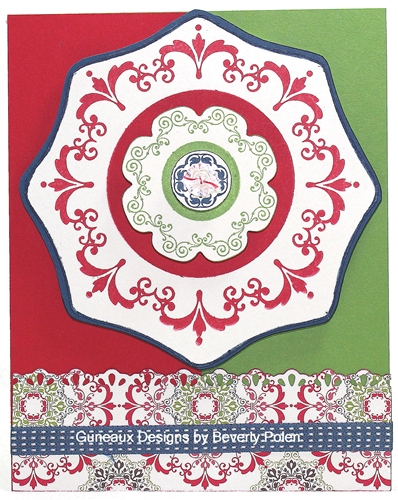
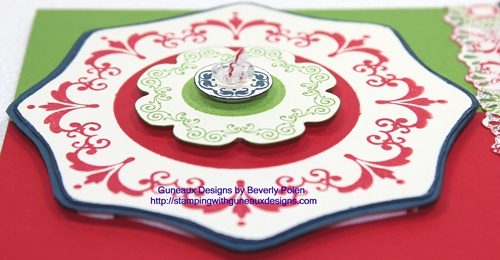
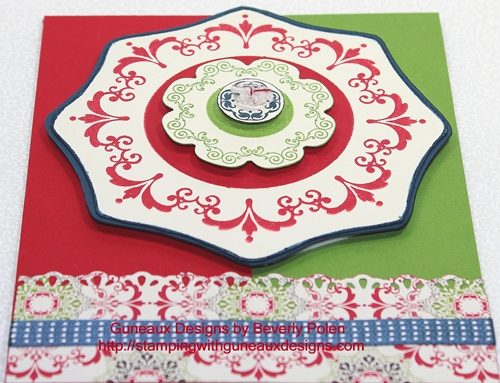
Today I am sharing a card that features the item I discussed in my last post — the stamp image from the Daydream Medallions (126467) stamp set.  Daydream Medallions is a stamp set intended to be used with the Floral Frames Framelits (127012); however, I did not use them for this card, as you can see.


For my previous post, no one attempted a guess on how I created the frame around the Daydream Medallions stamp image shown on the card.  Thus, let me reveal to you how to create this frame.  As stated in my last post, if you closely examine the stamp set, you will see the frame.  However, the following provides the tip.

TOOL TIP FOR DAYDREAM MEDALLIONS

For background purposes, let me share first that I keep the foam-backed rubber pieces that are left after removing Stampin’ Up! die-cut stamps.  I remove the paper from the back of the rubber pieces, place them back inside the stamp set cases, and insert the stamps back into the appropriate pieces after using them.  With the paper removed from the rubber, the pieces will stick to the plastic cases, as well as the clear blocks for clear-mounted stamps.  I refer to the left-over rubber pieces as the outlines of the die-cut stamps.

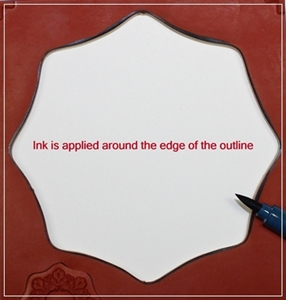
Some of the outline rubber pieces can be used as actual stamps when the design of the outline affords that opportunity!  That is how I created the frame around the large, stamped medallion from the Daydream Medallions stamp set.  I positioned the large medallion outline onto the Stampin Up Clear Block F (118483), used a Stampin’ Write Marker to apply ink around the outline of the medallion, and stamped the outline onto a piece of Very Vanilla card stock.  I then stamped the medallion within the frame.  That’s it!!  Try it; you’ll like it!

Stampin Up Products:

Stamp Set:  Daydream Medallions (c – 126467)

Paper:  Very Vanilla Card Stock, Gumball Green Card Stock, Real Red Card Stock, Midnight Muse Card Stock, and Candlelight Christmas Specialty Designer Series Paper (126901)

Ink:  Midnight Muse Stampin Write Marker, Real Red Classic, Gumball Green Classic, and Midnight Muse Classic

Accessories: Finishing Touches Edgelits Die (127010), Midnight Muse 3/8″ Stitched Satin Ribbon, and Vintage Faceted Designer Button

God’s Blessings!

Stamping With Guneaux Designs

Daydream Medallions

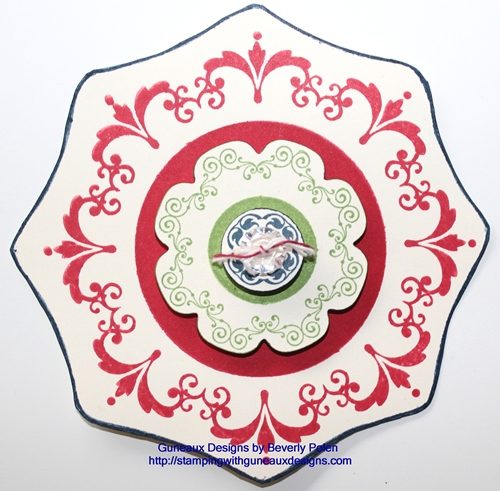
It is intended that the gorgeous Stampin Up Daydream Medallions Stamp Set (126467) be used with the wonderful Floral Frames Framelits (127012), right?  Being a person who tends to “think outside of the box”, I did not use the Floral Frames Framelits to frame the Daydream Medallions image in the picture below.  The picture is of an element that I am using to make a greeting card.

Looking closely, can you tell me how I made the frame around the Daydream Medallion stamp image?  If you have the Daydream Medallions stamp set, get it out and examine it closely and take a guess at how I framed the stamp image.  Leave your “guess” in the comments, and come back tomorrow to see the answer and the card that I made.

If I receive no guesses, I’ll assume there is no interest in learning a new method for framing the Daydream Medallions.

If you don’t have the Daydream Medallions stamp set, you can purchase it at my on-line shop.

Have a blessed day! Buy Stampin Up Products

God’s Blessings!
Stamping With Guneaux Designs
by
Beverly Polen

Think outside of the box when creating your artwork, especially when using the Daydream Medallions stamp set. 

September 11

September 11 —  today —  is the 11th anniversary of the terrorists’ attacks on the World Trade Center in New York and the Pentagon in Northern Virginia.  Where were you on that day?

I was working in a federal building just across the bridge from the Pentagon.  It’s a day I’ll never forget, as most Americans.  I was the Human Resources Director for a key agency within one of the cabinet-level departments.  People were coming to me asking what we should do.  Having no preparation for such a horrible event, I floundered.  But within minutes, I told my staff to leave the building.

Once outside of the building, I felt so vulnerable as I was out in the open.  “What do I do next?”, I thought?  What a horrible scene – people running, crying, and not knowing what to do.

Eventually, my carpool members and I met at my car (I was driving the carpool that day), which was three floors beneath another federal building.  My thoughts were, “Oh, my gosh, if this building should be hit, we will certainly die as we are so far underground.”  The word, FEAR, is not a strong enough word to describe how I felt.

On September 11, cell phones would not work nor would land lines.  I couldn’t contact my family to tell them where I was and that I was OK.  I knew they must be so worried.

The next obstacle was getting out from the underground onto the street.  Imagine this – MANY cars running and at a stand still three floors underneath a very tall building that was a stone’s throw from the Pentagon.  The fumes were choking.  “What if we can’t get out?”, I wondered.  Eventually we did, and as were crossed the bridge from D.C. into Virginia, the smoke was barrelling in the air around the Pentagon.  It was heartbreaking knowing that people were killed in the massive building we were passing by.

Finally traffic was moving and I got in the area of my then home in Northern Virginia.  I stopped at my daughter’s work and she had been disparately trying to reach me by phone.  She saw me drive up, came running outside, and we grabbed each other and I cried profusely.  I then went home to multiple phone messages (phones worked in my area) with people crying and asking me to call them.  One call was from my other daughter who lived in Florida.  My heart broke when I heard her message.  She knew where I worked and how very close I was to the Pentagon.  She was crying profusely in her message.  I quickly called her and others to inform them of my situation.

What a day that September 11 was!  I remember it so vividly as though it was just yesterday.  Today, I pray for the families who were not as blessed as I was, and thank God for my blessings!

God Bless the U.S.A. and our Military Men and Women!

In God We Trust!!!

My Digital Studio & Spooktacular Project Kit Offer

On Friday, September 14, the 31% discount on certain Stampin Up My Digital Studio digital downloads will expire.  If you’ve not purchased the ones you wanted, this week is your last opportunity.  There are 31 digital downloads for My Digital Studio at the 31% discount.  Don’t tarry!

If you have not tried My Digital Studio, you have options should you want to try it:

  1.  A free 30-trial of My Digital Studio 2, the new version.  With the trial, you’ll  get:
    * Full access to the software at NO COST for 30 days
    * Full access to design tools to create cards, photo books, calendars, and more
    * Full access to a sample of exclusive artwork from My Digital Studio 2+
    * The chance to buy additional downloads that you can keep after your trial expires
    * Ability to order your projects from our professional print services
    To use the software more than 30 days, buy MDS 2 (software only)or MDS 2+ (software plus $500 in content).
  2. A download of the complete My Digital Studio 2 software, which includes:
    * Full software with design tools to create cards, photo books, calendars, and more
    * $500 in digital content (See it all here)
    Features:
    * A downloadable version of the software to start designing right away
    * Easy to order professional prints of your designs
    * Mac and Windows compatible

Also, on Sunday, September 16, your opportunity to get the really cool Spooktacular Project Kit expires. If you have wanted to join the Stampin Up family, which makes you eligible for the Kit, don’t delay.

God’s Blessings!
Stamping With Guneaux Designs
by
Beverly Polen